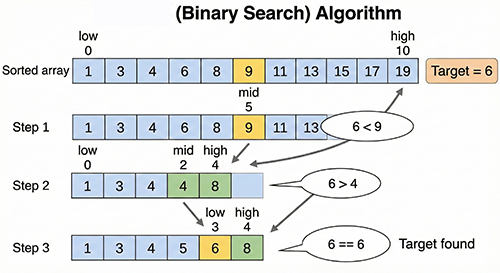
Binary search is a very efficient method for finding a specific value within a sorted list of data.
Think of it like looking up a word in a dictionary.
- Look at the middle word: First, you open the dictionary to the middle page and look at the word there.
- Compare: If the word you’re looking for comes before the middle word alphabetically, you only need to search the first half of the dictionary. If it comes after, you only need to search the second half.
- Repeat: You continue narrowing down the range by half until you find the value you’re looking for or the range becomes empty.
Specific Steps:
- Have a Sorted Dataset: Binary search only works on sorted data.
- Initialize Search Range: Set the first and last indices of the data as your initial search range.
- Get the Middle Element: Find the element at the middle index within the search range.
- Compare:
- If the target value matches the middle element, you’ve found it! Return the index.
- If the target value is smaller than the middle element, narrow down the search range to be from the first index to the middle index – 1.
- If the target value is larger, narrow down the search range to be from the middle index + 1 to the last index.
- Repeat: Repeat steps 3 and 4 until the search range is empty.
Advantages:
- Fast: Especially effective when dealing with large datasets. The number of searches needed grows logarithmically with the data size, making it very fast.
- Efficient: Much more efficient than linear search (searching from beginning to end).
Disadvantages:
- Requires Sorting: You need to sort the data beforehand.
- Needs Index Access: It’s best suited for data structures that allow random access to elements, like arrays. It’s not ideal for linked lists where accessing an element requires traversing from the beginning.
def binary_search(sorted_list, target):
  """Binary search function to find 'target' in a sorted list."""
  low = 0
  high = len(sorted_list) - 1

  while low <= high:
    mid = (low + high) // 2  # Calculate the middle index
    if sorted_list[mid] == target:
      return mid  # Found it!
    elif sorted_list[mid] < target:
      low = mid + 1  # Search the right side
    else:
      high = mid - 1  # Search the left side

  return -1  # Not found

# Example
my_list = [2, 5, 7, 8, 11, 12]
target = 11
result = binary_search(my_list, target)

if result != -1:
  print(f"Element {target} is at index {result}.")
else:
  print(f"Element {target} is not in the list.")
In Summary:
Binary search is a powerful algorithm for efficiently finding a specific value within sorted data. Understanding the dictionary analogy can help you grasp how it works.